Tuesday, November 9, 2010

Keyword Evaluation: Search Volume

As discussed in my previous post, Let’s Do Some Keyword Research, I’ve divided the keyword research topic into three different subtopics. These are the following:
  1. Keyword Evaluation
  2. Competition
  3. Exploration
To begin with, there will be three different subtopics under keyword evaluation. These are the following:
  1. Keyword Evaluation
    1. Search Volume
    2. Search Trends
    3. Commercial Value
  2. Competition
  3. Exploration
Today, we’ll start discussing what search volume is.

In a nut shell, search volume is basically the number of people searching for a particular keyword.  To find out how many people are searching for a particular keyword, we are going to use the Google Keyword Research Tool.  You may want to sign in using your Google account in order to avoid answering the captcha every time you do a keyword research.


To begin my keyword research, I’m going to input my keyword (the market that I decided to engage in, photography) in the Word or phrase box.  You may also want to add some options by expanding the Advance options section.  In my case, I’m going to search for All Countries.  Once we are done with our search parameters, we click the Search the button.


As you can see in the image below, the keyword “photography” is being searched 11,000,000 times monthly, which means that the search volume globally of the keyword “photography” is 11,000,000.  In addition, the search results that were displayed are niches under my market, photography.


Another thing that I want to discuss in this article is about match types.  Match types have three different types – broad match, phrase match, and exact match.  In order for us to clearly see the difference between these types, let’s look at these examples.  To make things a little bit simple to follow let’s look at the search term “photography ideas “.
 
Match Type
Description
Example
Exact Match
Relates to how many people are searching for the exact term “photography ideas” and then visits the top ranked websites.
  • photography ideas
Phrase Match
Relates to how many people are searching for a phrase containing the words “photography ideas” in this order.
  • photography ideas
  • photography ideas for beginners
  • wedding photography ideas
Broad Match
Relates to how many people are searching for a phrase containing the words “photography” and “ideas” in any word order along with additional words.
  • photography ideas
  • photography ideas for beginners
  • photography theme ideas
  • ideas for wedding photography

By default, Google search implements a broad match. To further demonstrate, here is an example.  I searched for the keyword “photography ideas” and here is what I got:
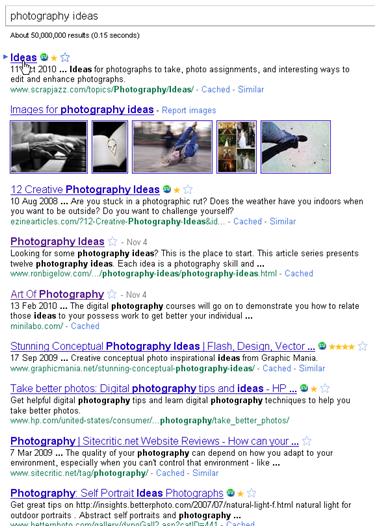
The 1st ranking website contains the word “Ideas” and not “photography ideas”.  The search result also shows other variances of our keyword phrase like photography ideas, art of photography, digital photography tips and ideas, and other variations.

For us to have a phrase match in our search result, we simply add a quote before and after our keyword phrase.  Here is an example:

The search results now contain our exact keyword phase “photography ideas”.
The next question is – what's the relevance of match types in search volume?  Here is an example for us to have a clear view of what are the relevance of these match types.
In Google Keyword Research Tool, let’s search for our keyword phrase “photography ideas”.  Once the results have been displayed, we select the three match types in the Match Types section.  The results will be refreshed and will show the results of the three match types.
 
As you can see, there are 33,000 broad match results, 18,100 phrase match results, and there are only 2,900 exact match results.  These figures are very significant because these will give us an idea on roughly how many people are searching for our target keyword monthly.

We have to take note that the search volume is not the only factor that we are considering in finding our “perfect keyword”. There are other factors that we need to consider and one of those is search trends, which will be discussed in my next article.

Thursday, November 4, 2010

Let’s Do Some Keyword Research

If you’ve read my previous article, What are Market, Niche, and a Micro Niche?, I’ve identified the different market niches that I want to engage in.  I’ve also considered various factors for me to come up with my final decision.  It was either to create a website about a topic that I am passionate about such as the asp.net web applications niche, or to create a site based on something I want to learn, like photography.


My final decision is to create a website about photography.  The main factor that made me come up with this decision is that I want to document all the things that I will learn with regards to this and hopefully, readers will find my articles helpful especially if they are new to this field.


Going to back to SEO, now that I’ve identified my market niche, the next step is to do keyword research.  This is like what most businessmen do before engaging in a business. They do market research first. They analyze different factors and come up with a strategy in order for them to penetrate their market.  That’s what keyword research is all about. We research first on the best keywords to use in order for us to penetrate our chosen market niche.  In my case, it’s the photography market.


To begin with, let’s start with the most basic of all questions: What are keywords?


A keyword is any term or phrase that users enter in the search field of the search engines.  It may be a single word, a phrase or an entire sentence.  What makes keywords important is that they serve as keys to unlock specific doors that provide access to market niches.  


When we do keyword research, our main goal is to find the “perfect keyword” in our market niche.  The “perfect keyword” has the following criteria:

  • Has a high search volume – People are trying to search for that term every single day.
  • Is on an upward trend or is consistently searched for – We want a keyword that people will still be searching months and years from now.
  • Has low competition – Websites which are badly optimized with that keyword and can be easily outranked by our website.
  • Is very specific – A keyword that is very clear and is exactly what the searchers are looking for.
  • Is a buying keyword – People searching for it are ready to buy and willing to pay money.

Now that we’ve defined what a “perfect keyword” is, the next question is how are we going to find our “perfect keyword”?  That’s where the keyword research kicks in.  In order for us to have an organized discussion of the topic, I’ve divided the keyword research into different parts (keyword evaluation, competition, and exploration) so make sure to watch out for those articles.

Thursday, October 28, 2010

What are Market, Niche, and a Micro Niche?

I'm planning to put up my own website where I can apply all the things that I've learned regarding SEO.  First thing to take note in putting up a website is to know what your market is. 

So, what really is a market? A market is a community of people who share a common interest in a particular subject or activity.  Often this community has its own language made up of terms and acronyms that only makes sense to other members of the community.

For us to have a clear view of what a market is here are examples:

Market
Area of Interest
Market Language
photographers photography
  • SLR Cameras
  • Canon/Nikon
  • macro shots
web developers web development
  • javascript
  • asp.net web applications
  • server side or client side scripting
bloggersblogging
  • blogs
  • Google AdSense
  • blog directories

One of these markets is the market that I'm considering to use in my website as these are the things that I'm currently interested at the moment. 

After deciding what our target market is, we have to identify our niche.

In every market, there are multiple niches.  A niche is a subset of a market that relates to a specific topic.  Here are examples of a niche:

Market
Example of Niches
photographers
  • digital photography basics
  • photography course
  • wedding photography
web developers
  • asp.net web applications
  • php web applications
  • open source web development
bloggers
  • blog host
  • blog softwares
  • free blog sites


Once we have identified the different niches of our market, we now have to identify its micro-niches.  Micro-niches are niches within niches.  Here are examples of micro-niches:

Market
Niche
Micro-Niche
photographers digital photography basics digital photography guide
photography course Canon photography course
wedding photography famous wedding photographers
web developers asp.net web applications c# web development
php web applications php web development tools
open source web development open source applications
Bloggers blog host best blog hosting service
blog softwares open source blog software
free blog sites most popular free blog sites

Now that I've identified the different markets, niches, and micro-niches that I'm interested to engage in, the next step is to identify the keywords which are related to our market niches.  This will be discussed in my next post.

Sunday, October 24, 2010

Popular Blog Directories to Submit Our Blog

In connection to my previous post, here is an article that my friend gave me which can help the popularity of our blog.

Most of them are not free.  What's your experience with these websites?

Thursday, October 21, 2010

Increase Your Blog’s Popularity with the Help of Technorati

While I was working, my friend Pat Ambrosio messaged me and told me that he saw my blog and gave me some tips on how to make my blog popular. One of those is to submit my blog to Technorati.  As I am new to blogging and I am not aware of it, I immediately checked the site. 

According to the FAQ section of the site, by claiming our blog, our blog will be added in the Technorati’s Blog Directory under the categories that we have specified.  We may also add tags for our blog so that our blog will be listed in their Tag pages for those tags.  With that, Technorati users will be able to see our blogs under the categories and tags that we’ve specified.  Also, if our blogs are doing well, our blogs may be listed in the Technorati Top 100.  

Here are the steps on how to claim our blog in Technorati:
  1. Go to the Technorati homepage and log in using your account by clicking the Sign In link.  If you don’t have an account yet, click the Join link and register.
  2. If you are now logged in, click your username beside the [sign out] link to access your profile.
  3. Start claiming your blog by providing your blog’s URL and click the Claim button.
  4. Fill in all the necessary fields and make sure to provide a good title and description for your site, as this will market your site to your target readers.  Also, make sure to select the correct category and tags for your site.
  5. Click the Proceed to the next step button.
  6. An e-mail will be sent to you containing your claim token.
  7. Verify your blog by posting something in your blog containing the claim token.  You may want to delete your post after verifying it.
  8. Go to your Technorati account and click the “Check Claim” button.  I’m not sure how long it takes Technorati to show this in your profile page.  Some say it only took them almost a day but some say it took forever for this option to show up.   In my case, it took almost a week for this option to become visible in my account page.  Now that this option is visible in my account page, I need to wait until Technorati crawls my site.
  9. After a day, Technorati is now crawling my blog.

Tuesday, October 5, 2010

On-Page Factors Dissected


Before we talk about the different strategies that we’re going to use in order for us to improve our rankings, we need to familiarize ourselves first with the on-page factors which will be crucial in building our strategy.  I’m talking about the different tags that are normally found in the upper section of our HTML page (as shown in Figure 1).  So, let’s dissect the different html tags and discuss how it will help us in our strategies. Here are some concepts from the Google Best Practices Guide by Jerry West.

 Figure 1

  1. DTD Statement – It is the first tag on a webpage and we need to make sure to use the correct tag.  Codes written in HTML 3.2 might cause problems if HTML 4.01 is declared in our DTD statement.  For us to verify if we are using the correct tag, we can double check it in this site.  Testing shows that having this tag in place not only allows our site to load faster in major browsers, but also allows faster indexing.
  2. Character Set Tag – This tag tells the browser how to display the text and this should be defined before any text appears in the browser.
  3. Title Tag – The title tag is the text that users normally see at the top of the web browser window.  It is also the linked text in the search results of all major search engines.  All search engines index the Title tag, that’s why it is important for us to choose the proper title.  It is not advisable to place the company name in this tag because what we want is for our Title to grab attention, create curiosity, and evoke emotion to get customers to click on it.  Our Title must be brief and concise because Google will only display up to the first 65 characters.  Also, please take note not to use duplicate or near duplicate Titles across a site because it can harm a site’s ranking power.
  4. Meta Description Tag – When users perform a search, the results displayed are usually the Title Tag and the Description Tag.  If a Description Tag was not supplied, by default, the browser will use the first 30-40 words on the page, which may be critical because those words may not accurately describe the services that our site offers.  Thus, we have to make sure that the content of our Description Tag contains our focused keyword phrases (we’ll discuss keyword phrases in my future entries).  We must also limit the content of our Description Tag to 165 characters or less.
  5. Meta Keyword Tag – Use 6-8 keywords phrases in the Meta Keyword Tag but make sure not to include “money phrases” (highest converting phrases) because the Keyword Tag is the first place where competitors look to steal information and we do not want that to happen.  Please note that Google already stopped indexing this tag while Bing and Yahoo! are still indexing this.
  6. Robots Tag – By default, the value is “index, follow”.  This means that the search engine will index the page and follow links on this page.  If we want our page to be indexed and followed by major search engines, it’s better not to include this tag because it makes no difference.  However, we may add this tag to pages which are not important for SEO like Contact Us, Privacy Policy, and Terms of Use pages by simply adding the tag and instead of “index, follow” value we use “noindex, nofollow” or a combination of the options.  Another way of doing this is by creating a robots.txt file.  To understand more about robots.txt, please visit this site.
  7. Google Sitemap – This is the best way to get a site crawled and deeply indexed.  We’ll discuss more of this in my future entries.

Friday, October 1, 2010

What is SEO?

Imagine how many websites and blogs are out there. What are the odds that a user will just suddenly land in your website and find some time to browse everything that’s written in it? 

How do you make your website popular and create traffic for your site?  Some say you have to make your site visually pleasing.  Others say that the content is more important.  I believe that these two factors are essential, but what’s the point of all of this if no one is visiting your site?  That’s where SEO kicks in.

As defined by Wikipedia, SEO or Search Engine Optimization is the process of improving the visibility of a website or a webpage in search engines via the "natural" or un-paid ("organic" or "algorithmic") search results. Other forms of search engine marketing (SEM) target paid listings. In general, the earlier (or higher on the page), and more frequently a site appears in the search results list, the more visitors it will receive from the search engine. SEO may target different kinds of search, including image search, local search, video search and industry-specific vertical search engines. This gives a website web presence.

What we all want to achieve is to make our website rank in the first or second page of the major search engines like Google, Bing, and Yahoo!.  Let’s face it – how many of us actually make the effort to browse the search results all the way to the last page?  Personally, I normally browse up to the 3rd page, and after that, I start typing in a new keyword if I was not able to find what I’m looking for.  Thus, the higher the rank of our website in the SERP (Search Engine Results Page), the higher the chance a user will visit our site.

What are the strategies that we need to do in order for us to achieve that? That’s what we’re going to discuss in my future blog entries so make sure to watch for it.